|
Preference |
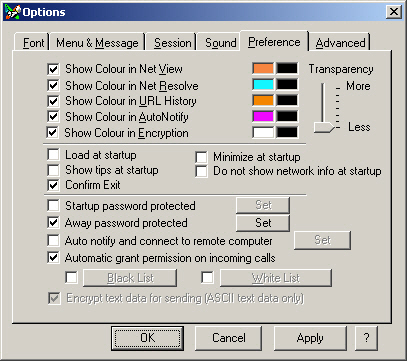
Customize x Chat internal features
Show Colour in Net View - Show colour in text and text background .
Show Colour in Net Resolve - Show colour in text and text background.
Show Colour in URL History - Show colour in text and text background.
Show Colour in Auto Check - Show colour in text and text background.
Show Colour in Encryption - Show colour in text and text background.
Transparency - Set transparency level in Windows 2000/XP.
Load at startup - Automatic load x Chat for all users when windows starts. (Registry Setting - HKLM\Software\Microsoft\Windows\CurrentVersion\Run)
Minimize at startup - Stay in system tray (Recommended associated with Load at Startup)
Show tips at startup - Display hints to use x Chat effectively every time it starts.
Confirm Exit - Prompt you to confirm every time the program ends.
Do not show network info at startup - Do not try to connect to the internet to resolve hostname.
Startup Password Protect - Prevent any person from using x Chat to chat with other person.
Away Password Protect - Prevent any person from using x Chat when you are away and minimize it.
Auto notify and connect to remote computer - Check remote online status and/or connect to remote computer. Click Here for Configure
Do Not Prompt to Accept Incoming Chat - No display incoming IP address before you accept the connection.
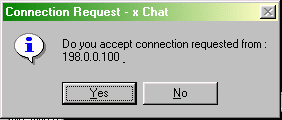
IP Blocking is a feature to get rid of
some users from annoying you by identify their IP addresses.
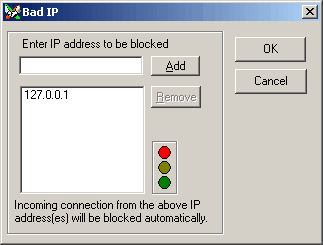
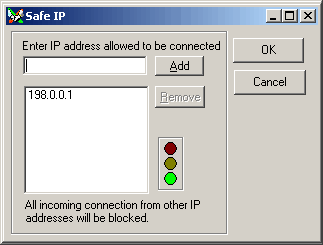
(These are examples only. 127.0.0.1 is your local IP address)
Use Encryption for Data Sending - Any text-based data will be encrypted
before sending. You may turn it off to speed up transmission. (Once the session
is connected, you can not change this option.)
** To maximize security issue, select both password options, Use Encryption for Data Sending and turn off Auto Accept Accept Incoming Connection.