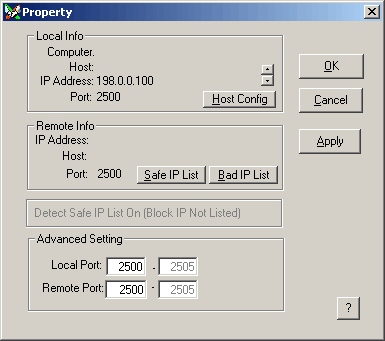
| Property |
Local and Remote Network Information and Settings
* Both Local Info and Remote Info cannot be edited directly.
Local Info
Computer Computer Name or Net BIOS name Host Hostname (It may be the same as computer name, depended on your network setting)
[You may change your hostname by edit the hosts file.]IP Address Single or Multiple IP Addresses (Scroll up or down) Port :Local Listening Port (Used to accept incoming connection) Host Config If the hostname you enter does not resolve to IP address, then you may use 'HOSTS' file to add this hostname to the hosts table. Next times, when you enter IP address, the program will look up the table and retrieve the hostname from there. You may have a look of the following Microsoft support document.
http://support.microsoft.com/support/kb/articles/Q139/2/70.ASP
Remote Info (While Connected to Remote Computer)
Host : Remote Hostname
IP Address : Remote IP Address
Port : Remote Connect Port (Used to make connection)IP Blocking (See also IP Blocking in Options - Preference)
Advanced Setting (Not Editable While Connected)
The term 'Port' or 'Port Address' is similar to our 'Extension Number' of telephone. IP Address is the telephone phone. You have to find out the right IP address and Port to reach that person. Other Internet/Intranet program have a large range of default port addresses for incoming and outgoing connection. x Chat, in contract, is a customized program for you and let you control the port addresses.
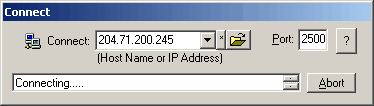
Local Port: By Default, the listening port of x Chat is 2500. If the address port is used by another program, there will be a socket error. When you click 'Ok' or 'Apply' button, x Chat will try to adjust the port address to the next value (e.g.. 2501). If all port addresses of 2500 to 2505 is occupied by other programs, you have to set the port address manually.
You can also adjust the port address manually. However, beware of those special port addresses that may conflict with other programs, such as 25, 80, 110 etc.After you set the port address, please make sure the connect status is 'Ready' in the status bar of the main window.
Remote Port: By Default, the remote port is 2500. That is the local port address of remote computer. If the remote computer (which you want to connect to) is not using default port, x Chat will try the next value to connect until port 2505.